
Documentation
Quick Access
Overview
Anti-Wallhack Visibility System is a Unity-based server-side solution designed to prevent wallhacks and unauthorized player detection in competitive or multiplayer games. It validates whether a player truly has line-of-sight to another using precise linecast checks and directional sampling, ensuring visibility is based on legitimate rendering logic and not client-side manipulation.
Core Purpose
- Prevents wallhacks by validating visibility through geometry
- Ensures that visibility logic is server-authoritative
- Uses safe rendering logic based on face-aligned normals and line sampling
What it Offers
- Observer-based visibility sampling
- Dynamic line generation per face
- Field-of-view validation with aspect ratio and pitch control
- Real-time visibility events per observer/player pair
- Editor tools for debugging visibility in play mode
- UnityEvent integration for easy event handling in the Editor
- Broad-phase optimization for scalable visibility checks PRO
- Latency, movement, and animation compensation PRO
- Shadow-based and reflection environment detection PRO
- Performance benchmark data for server-like scenarios
Setup
1. Add the ObserverManager
Create an empty GameObject in your scene named ObserverManager and attach the ObserverManager component. This component manages all observers and players in the visibility system.
Note: ObserverManager uses [DefaultExecutionOrder(-200)] to ensure it initializes early in the Unity update cycle.
2. Add PlayerObserver to Observers
Attach PlayerObserver to the GameObject representing the player camera.
This component is responsible for detecting other players based on the configured visibility mode.
In 360° mode, only the position is required.
Observer Mode (180° vs 360°)
The PlayerObserver supports two detection modes that define how visibility is calculated:
- 180° (FOV-based): Uses camera direction and frustum-based detection (classic behavior)
- 360° (Sphere-based): Uses distance-only detection, ignoring camera rotation
In 180° mode, visibility is calculated using field of view (FOV) and requires camera rotation data.
In 360° mode, visibility is based purely on distance, allowing detection in all directions — including behind the player.
3. Add NetworkPlayerVisibilityDetector to Players
Attach NetworkPlayerVisibilityDetector to each player. This component is required for the system to function in multiplayer environments.
PlayerVisibilityDetector component is automatically added when you attach NetworkPlayerVisibilityDetector. You do not need to add it manually.
The PlayerVisibilityDetector is responsible for handling visibility checks, including geometry sampling and linecasts.
Collider Setup (Player box, Player cylinder)
A collider is required to define the player’s geometry for visibility detection.
- You can place the collider on the root or a child GameObject
- Using a child object can improve transform control and alignment
- Ensure the collider accurately represents the player's shape
- Configure
obstaclesMaskto include walls and blocking geometry
Advanced Geometry PRO
The PRO version includes a PlayerCylinder option, allowing you to use cylindrical geometry instead of a box.
- Better approximation for humanoid characters
- More consistent visibility results at angles
- Improved fairness in competitive scenarios
4. (Optional) Add VisibilityUnityEventRelay
To handle visibility events without scripting, attach VisibilityUnityEventRelay to the same GameObject as PlayerVisibilityDetector and configure the onVisibilityChanged UnityEvent in the Inspector.
5. Connect Components
PlayerObserver, PlayerVisibilityDetector, and VisibilityUnityEventRelay auto-register with the ObserverManager at runtime.
6. Enable Gizmos for Debugging
In the Scene view, enable Gizmos to visualize FOV cones, face normals, and linecast paths.
7. (Optional) Add ShadowLight PRO
To enable shadow-based Environment Detection, add a ShadowLight component to supported light sources and assign or refresh them through the PlayerVisibilityDetector.
8. (Optional) Add ReflectionSurface PRO
To enable reflection-based Environment Detection, add a ReflectionSurface component to each mirror, window or reflective plane. Surfaces register themselves automatically while enabled, so there is no list to assign on the PlayerVisibilityDetector. Make sure the object's local +Z axis (blue arrow) points away from the reflective face, since it defines the reflection plane normal.
Core Components Explained
ObserverManager
Core
The ObserverManager is the central coordinator of the visibility system. It manages the registration and unregistration of observers and players, controls visibility state changes, dispatches visibility events, and provides global access to visibility-related operations.
Key fields and methods:
- Instance (singleton)
- OnVisibilityChanged (event)
- RegisterObserver / RegisterPlayer / UnregisterPlayer
- ChangeVisibility / IsPlayerVisibleToObserver / GetAllPlayersExcept
Call Rate Mode
The ObserverManager includes a configurable call rate system that controls how often visibility updates are executed. This allows developers to balance detection responsiveness and CPU usage according to the needs of the project.
- Unlimited: Visibility is updated every frame
- Limited: Fixed update rate
When using Limited, you can define how many visibility updates are executed per second. Lower update rates reduce CPU usage and improve scalability, while higher update rates provide faster visibility response and greater accuracy.
PlayerObserver
Core
The PlayerObserver represents the player's vision in the system. It is responsible for determining which targets should be evaluated for visibility.
Observer Mode
Defines how the observer searches for visible targets.
- 180°: Uses camera direction, FOV, aspect ratio, and precise frustum validation
- 360°: Uses distance-based detection in all directions around the observer
Camera & Detection Settings
maxObserverAngle→ Defines the detection mode: 180° or 360°cameraFOVAngle→ Base vertical FOV used for visibility detectionbroadPhaseFOVMultiplier→ Expands the broad-phase FOV check before precise validationviewDistance→ Maximum detection distanceaspectFormat→ Aspect ratio used to calculate horizontal FOVdetectionMode→ Defines how the target is tested during observer filteringsmoothSpeed→ Controls smoothing speed for dynamic FOV transitions
Aspect Ratio
The observer uses the selected aspect ratio to calculate horizontal FOV from the configured camera FOV. This helps match visibility detection with the player's real screen format.
4:316:916:1021:932:9
Detection Mode
- ClosestPoint: Faster, uses the closest collider point and optional cached shadow point
- BoundsCorners: More precise, tests collider boundary points and optional cached shadow point
Broad Phase Optimization
Broad Phase Optimization is an early filtering step used before expensive visibility checks. Instead of running detailed physics and sampling validation against every player, the observer first performs a lightweight distance and FOV approximation.
This reduces unnecessary calculations by quickly rejecting targets that are clearly outside the observer's possible visibility area.
- Performs a fast distance check before detailed validation
- Uses an expanded FOV approximation to reduce false negatives
- Prevents unnecessary line sampling against distant or invalid targets
- Improves scalability when many players are active
Broad Phase FOV Multiplier
The broadPhaseFOVMultiplier controls how much the initial FOV check is expanded before precise frustum validation.
Higher values are more tolerant, while lower values are stricter and more performance-focused.
- Lower values: Better performance, but may reject targets too early
- Higher values: Safer detection, but allows more targets into detailed checks
FOV Compensation PRO
FOV Compensation dynamically expands the observer's field of view to reduce visibility loss caused by fast camera rotation and network latency.
- Disabled: Uses the configured FOV without compensation
- Rotation: Expands FOV based on camera rotation speed
- RotationAndLatency: Combines camera rotation and ping compensation
FOV Compensation Parameters
minAngularSpeed→ Minimum camera rotation speed required before compensation startsmaxAngularSpeed→ Rotation speed where maximum compensation is reachedmaxPingFOVExpansion→ Maximum FOV expansion caused by network latencymaxRotationFOVExpansion→ Maximum FOV expansion caused by camera rotationmaxPingForFullCompensation→ Ping value where latency compensation reaches full strength
Observer Prediction PRO
Observer Prediction offsets the virtual observer position to compensate for player movement and latency. This improves visibility consistency when players move quickly or peek around corners.
- Disabled: No positional prediction
- Velocity: Uses player movement velocity to offset the virtual observer
- VelocityAndLatency: Scales velocity prediction using network latency
Prediction Parameters
maxPredictionDistance→ Maximum virtual observer offset distancevelocityPredictionScale→ Scales how strongly velocity affects predictionlatencyExpansionMultiplier→ Caps latency-based prediction growthpredictionAxisMode→ Selects lateral, frontal, or combined predictionlateralWeight→ Weight applied to side movement predictionfrontalWeight→ Weight applied to forward movement prediction
Prediction Axis Mode
- Lateral: Compensates side movement, useful for corner peeking
- Frontal: Compensates forward and backward movement
- LateralAndFrontal: Combines both axes for more complete prediction
Grace Prediction PRO
Grace Prediction smooths latency-aware prediction when a target was recently visible. This helps reduce flickering when players rapidly move in and out of cover.
useGracePrediction→ Enables prediction smoothing after recent visibilitygracePingStart→ Ping where grace prediction begins to take effectgracePingMax→ Ping where grace prediction reaches full strengthminGraceScale→ Minimum prediction scale when grace is fully active
Configuration Examples
180° Mode — Precision Setup
          Max Observer Angle = 180
          Camera FOV Angle = 60
          Broad Phase FOV Multiplier = 1.7
          View Distance = 250
          Aspect Format = 16:9
          Detection Mode = BoundsCorners
          FOV Compensation Mode = RotationAndLatency
          Observer Prediction Mode = VelocityAndLatency
360° Mode — Distance-Based Setup
          Max Observer Angle = 360
          View Distance = 250
          Detection Mode = ClosestPoint
          FOV Compensation Mode = Disabled
          Observer Prediction Mode = Velocity
Gizmos
showGizmos— Enables visualization in Scene view
PlayerVisibilityDetector
Core
Responsible for performing visibility validation using line sampling, collider geometry, physics-based checks, and optional environment-based detection.
This component works together with PlayerObserver and is automatically added when using
NetworkPlayerVisibilityDetector.
NetworkPlayerVisibilityDetector.
Collider Settings
- Free: Uses
PlayerBox(box-based detection) - Pro: Supports
PlayerCylinderfor more realistic player shape - Collider can be placed on root or child GameObject
Line Sampling
- Fixed Lines → constant visibility checks
- Dynamic Lines → sweeping lines for better precision
- Adjustable density and speed
// Key parameters
verticalFixedLineCount
horizontalFixedLineCount
dynamicLineSpacing
dynamicLineSpeed
Grid Subdivision
Defines how the collider is subdivided for sampling.
- Vertical lines (rows)
- Horizontal columns
Alignment Filtering
alignmentThreshold→ Minimum valid angletargetAlignmentThreshold→ Refined target validation
Environment Detection PRO
Environment Detection extends the regular line-of-sight validation by allowing the system to detect players through indirect visual information, such as projected shadows and reflections. This makes visibility checks more realistic in scenarios where the player body is hidden, but environmental clues are still visible.
- Disabled: Uses only direct line-of-sight validation
- Shadow: Enables indirect detection through projected shadows
- Reflection: Enables indirect detection through reflective surfaces
Shadow Detection Settings PRO
When Environment Detection is set to Shadow, the detector uses registered ShadowLight sources to evaluate whether a player's shadow is visible to the observer.
Light Sources→ List ofShadowLightcomponents used for shadow visibility checksMin Shadow Vertical Angle→ Minimum vertical angle required for a shadow to be considered validShadow Line Count→ Number of lines used to sample the projected shadowShadow Light Refresh Rate→ How often the detector refreshes nearby or assigned shadow lightsEnable Shadow Ground Projection→ Projects shadow samples onto the environment for improved accuracy
ShadowLight sources, obstacle masks, and scene geometry. Incorrect setup may cause false positives or missed shadow visibility.
Reflection Detection Settings PRO
When Environment Detection includes Reflection, the detector uses every enabled ReflectionSurface in the scene to evaluate whether a player is visible through its reflection. Environment Detection is a flags field, so Shadow and Reflection can be enabled together.
Show Reflection Lines→ Draws the observer → surface → player path in the Scene viewObstacles Mask→ Also used for the two reflection linecasts (observer to surface, surface to player)
ReflectionSurface component itself.
Size Compensation
- Free: Velocity-based expansion
- Pro: Velocity + Animation + Latency
Animation Compensation PRO
Animation Compensation dynamically adjusts the visibility sampling area according to the current animation pose. This helps prevent situations where important body parts move outside the base collider and become incorrectly ignored by visibility checks.
- Detects animation pose overflow outside the player collider
- Supports head, hands, and feet compensation
- Improves visibility accuracy during running, crouching, jumping, leaning, and attack animations
- Requires a Humanoid Animator, and Always Animate culling on a dedicated server
- Works together with velocity and latency compensation systems
Advanced PRO
- Cylinder angular sweep control
- Latency-based expansion scaling
- Animation-based collider adjustment
- Double wall optimization check
- Shadow-based environment detection
- Reflection-based environment detection
Performance & Stability
stateStabilizeTimeprevents flickering- Layer masks control raycast cost
- Smoothing reduces abrupt changes
- Shadow light refresh rate helps control environment detection cost
PlayerBox (Free)
CoreDefines the bounding box used for player visibility detection. It is responsible for providing the geometric base used by line sampling and alignment checks.
Core Settings
skinWidth→ Adds a small margin to avoid precision issuesboxExpansionAxisAdjustment→ Controls how expansion applies per axisenableColliderWallClamping→ Prevents detection through walls
Gizmos (Basic)
- Toggle visualization
- Basic collider color display
PlayerBox PRO
PROThe Pro version extends PlayerBox with advanced debugging, visualization tools, and an enhanced wall clamping system, allowing detailed inspection of visibility behavior in real time while improving collision accuracy and reliability.
Advanced Wall Clamping
- Improved collision detection around complex geometry
- More accurate handling of corners and thin walls
- Better stability in fast-paced scenarios
Advanced Gizmos
- Per-player color visualization
- Base vs Expanded collider comparison
- Line clamp visualization
- Debug line points rendering
        // Examples
        showBaseSize
        showExpandedSize
        showLineClamp
        linePointRadius
PlayerCylinder PRO
PRO
The PlayerCylinder provides a more accurate geometric representation of the player using a cylindrical shape.
This improves visibility detection in scenarios where box-based colliders are not precise enough, especially around corners and curved movement paths.
Geometry Settings
radius→ Defines player widthheight→ Defines player heightcenter→ Adjusts collider offset
Expansion & Compensation
expansionFactor→ Global size multiplier for safety marginexpansionAxis→ Controls which axes are expanded (X, Y, Z or all)cylinderExpansionAxisAdjustment→ Fine-tunes radius and height expansionSkinWidth→ Prevents precision issues in collision checks
Advanced Wall Clamping
- Rotating scan system around the cylinder
- Continuous obstacle detection
- Handles thin walls and corner exposure
speedLineClamp→ Rotation speed of the scanraysClampPerFrame→ Number of rays processed per frameenableColliderWallClamping→ Enables collision safety system
Performance Considerations
- Adjust scan speed for performance vs accuracy
- Reduce rays per frame on large-scale matches
- Use only when high precision is required
Gizmos
- Real-time cylinder visualization
- Expansion preview
- Line clamp debug rendering
ShadowLight PRO
PROShadowLight represents a light source capable of generating shadow visibility information for the Environment Detection system.
Supported Light Types
- Directional: Infinite directional light (sunlight)
- Point: Radial light source
- Spot: Cone-based light source
Shadow Modes
- Simple: Fast single-line shadow evaluation
- Accurate: Multi-line shadow sampling for improved precision
Light Settings
Light Type→ Defines the light source typeRange→ Maximum shadow influence distanceSpot Angle→ Cone angle used by Spot lightsNear Horizontal Angle→ Controls shadow projection spreadSync With Unity Light→ Automatically synchronizes settings with a Unity Light component
Performance Recommendations
- Use Simple mode for large-scale matches
- Use Accurate mode only when shadow precision is required
- Reduce Shadow Light Refresh Rate for better performance
- Limit the number of active ShadowLights in large maps
ReflectionSurface PRO
PROReflectionSurface marks a mirror, window or any reflective plane that the Environment Detection system can use to validate whether a player is visible through its reflection.
Surface Orientation
The reflection plane is defined by the transform position and its local +Z axis (blue arrow), which must point away from the reflective face. The yellow gizmo line shows the current normal direction.
Reflection Modes
- Simple: Reflects a single main player point — fastest option
- Accurate: Reflects multiple collider bounds points for better precision near the surface edges
Surface Settings
Size→ Width and height of the reflective areaEdge Tolerance→ Extra margin around the surface, preventing visibility from dropping abruptly near the edges
Detection Settings
Max Distance→ Maximum distance at which observers can detect reflectionsReflection Surface FOV→ Minimum viewing angle required before reflection checks runReflection Mode→ Simple or Accurate samplingObstacle Mask→ Layers that block the line between the observer and the surface itself
How Detection Works
- The observer first runs a cheap surface check: distance, then viewing angle, then a linecast to the surface center using the surface Obstacle Mask
- Only surfaces that pass are evaluated for that tick
- The observer position is mirrored across the reflection plane, and the point where the mirrored line crosses the plane becomes the reflection point
- The reflection point must land inside the surface area, including Edge Tolerance
- Two final linecasts validate the path: observer → reflection point and reflection point → player, both using the detector Obstacles Mask
Show Reflection Lines on the PlayerVisibilityDetector to visualize the path in the Scene view. Cyan is the observer to reflection point segment, green is reflection point to player, and red marks a rejected reflection.
Performance Recommendations
- Use Simple mode when edge precision is not critical
- Keep Max Distance and Reflection Surface FOV as tight as the map allows, since both reject surfaces before any reflection math runs
- Restrict Obstacle Mask to layers that can realistically block a reflection
- Limit the number of active reflection surfaces in large maps
VisibilityUnityEventRelay
Core
Relays visibility events to a UnityEvent for easy editor configuration. Requires PlayerVisibilityDetector on the same GameObject.
How It Works
The system determines player visibility using a combination of Field of View (FOV) filtering, geometric sampling, environment detection, and physics-based validation. All checks are executed on the server, ensuring that visibility cannot be manipulated client-side.
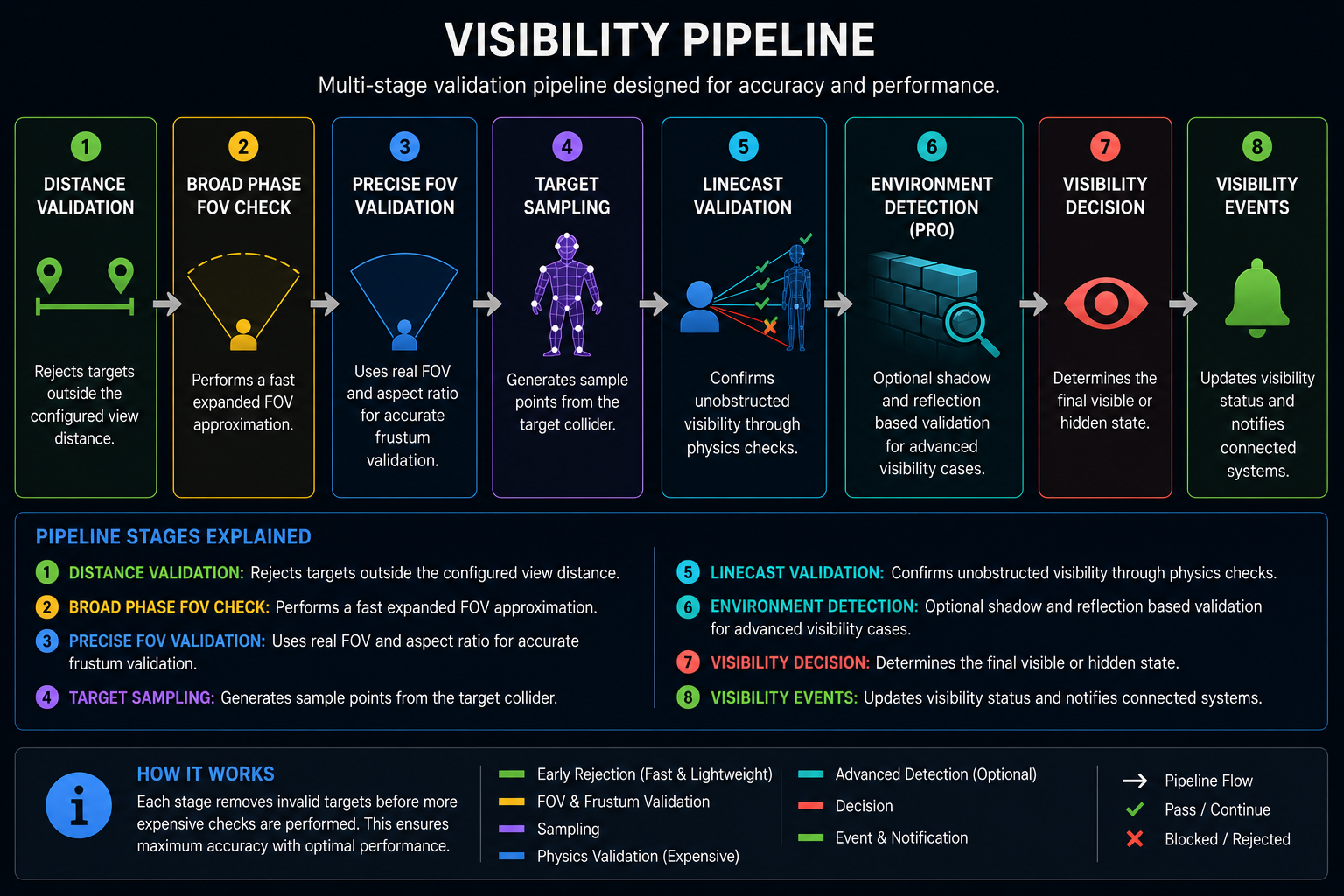
Visibility Pipeline
Visibility determination follows a multi-stage validation pipeline designed to maximize accuracy while minimizing unnecessary calculations.
Core Concepts
- Server-Side Authority → Prevents cheating and client manipulation
- Broad Phase Filtering → Rejects invalid targets before expensive calculations
- Line Sampling → Uses multiple rays instead of a single visibility check
- Dynamic Scanning → Improves coverage and precision over time
- Wall Clamping → Prevents visibility through solid geometry
- State Stabilization → Reduces flickering and unstable visibility states
Advanced Features PRO
- Cylindrical collider support for more realistic player representation
- Environment Detection through projected shadows
- Reflection-based visibility detection through reflective surfaces
- Animation-aware collider expansion
- Latency and velocity compensation
- Dynamic FOV compensation
- Advanced wall clamping for complex geometry
Networking Note
For deterministic multiplayer frameworks such as Photon Fusion, visibility checks should run inside fixed-tick simulation methods such as FixedUpdateNetwork().
Avoid using rendering loops or frame-dependent updates for visibility validation.
Performance Benchmarks
The following results were captured in a server-like benchmark scenario using a 50m × 50m high-density stress test with 2 teams. The test measures visibility processing cost under different player counts.
Server-Like Benchmark Results
| Players | FPS Impact | System Time | Cost / Player | Raycasts / Frame |
|---|---|---|---|---|
| 10 | 1.44% | 2.10 ms | 0.210 ms | 397 |
| 25 | 4.86% | 5.72 ms | 0.229 ms | 949 |
| 50 | 13.44% | 19.43 ms | 0.389 ms | 5,057 |
| 100 | 44.08% | 61.46 ms | 0.615 ms | 15,008 |
Performance Summary
| Scenario | Result |
|---|---|
| Typical Competitive Match (10 Players) | 1.44% Impact |
| Medium Match (25 Players) | 4.86% Impact |
| Large Match (50 Players) | 13.44% Impact |
| Stress Test (100 Players) | 44.08% Impact |
Benchmark Environment
- 50m × 50m high-density area
- 2 teams
- Server-like mode
- ObserverManager update rate: 32 ticks per second
- Observer mode: 180° FOV-based detection
- Environment Detection disabled
- Editor rendering minimized
- Real visibility calculations using FOV validation, linecasts, and collider sampling
How to Tune & Optimize
Tuning, Optimization & Best Practices
The Anti-Wallhack Visibility System is highly configurable, allowing you to balance precision, responsiveness, and performance based on your game's needs. Proper tuning ensures stable visibility detection while minimizing unnecessary computations.
Performance vs Accuracy
The system relies on line-based visibility checks and compensation algorithms. Increasing precision typically means more calculations per frame. Finding the right balance is essential, especially in multiplayer environments with many players.
- Higher line counts: Improves detection accuracy but increases CPU usage
- Lower line counts: Reduces cost but may introduce small visibility inaccuracies
- Dynamic lines: Provide better coverage over time with lower constant cost
Observer Optimization
The PlayerObserver controls how visibility is calculated from the player's perspective.
Adjusting its parameters can significantly impact both performance and gameplay feel.
- Reduce
viewDistanceto limit unnecessary checks - Use
ClosestPointfor faster FOV checks when high precision is not required - Adjust
smoothSpeedto control how quickly visibility reacts to changes
Detection Stability
Sudden visibility changes can create flickering effects. The system includes stabilization mechanisms to ensure smoother transitions.
- Increase
stateStabilizeTimeto reduce flickering - Lower values improve responsiveness but may cause instability
Call Rate Optimization
The ObserverManager allows you to control how often visibility updates are executed.
- Unlimited: Best accuracy, runs every frame
- Limited: Better performance, runs at a fixed rate
Use a limited call rate in large-scale multiplayer scenarios to significantly reduce CPU usage.
Advanced Optimization PRO
The Pro version introduces advanced compensation systems that improve accuracy under real-world network conditions.
- Latency Compensation: Adjusts visibility based on network delay
- Velocity Prediction: Predicts player movement for smoother detection
- FOV Compensation: Expands visibility dynamically based on camera movement and ping
- Advanced Wall Clamping: Reduces false positives when players are close to walls
These systems are especially important in fast-paced multiplayer games where precision and fairness are critical.
Integration Examples
This section provides complete, ready-to-use integration examples for the Anti-Wallhack Visibility System across multiple networking frameworks.
All examples follow a server-authoritative architecture, ensuring secure and consistent visibility detection in multiplayer environments.
- Photon Fusion: High-performance tick-based networking (recommended)
- Mirror: Simple and flexible server-authoritative solution
- Netcode for GameObjects: Official Unity networking framework
- Photon PUN: Legacy solution, still widely used
- Fish-Networking: Advanced and highly performant
🔓 PRO Version: Ready-made adapters and drivers for every supported framework. Attach the two components and visibility validation runs on the server, with the camera direction and latency already synchronized for you.
Supports Photon Fusion, Mirror, Netcode for GameObjects, PUN and Fish-Networking. Netcode and PUN also hide players per client out of the box, while Fusion, Mirror and Fish-Networking expose a documented hook so visibility plugs into the interest management each framework already provides.
Get PRO Version 🚀Each tab includes complete class examples, RPC handling, and best practices for visibility synchronization.
Photon Fusion
Full classes adapted for Fusion. Note: use Runner.IsForward + Runner.IsServer to run logic only on valid server forward ticks.
// NetworkPlayerVisibilityHandler.cs
          using Fusion;
          using UnityEngine;

          public class NetworkPlayerVisibilityHandler : MonoBehaviour
          {
              [SerializeField] private NetworkTRSP networkTransform; // or your network transform wrapper
          }
// NetworkPlayerObserver.cs
      using Fusion;
      using UnityEngine;

      public class NetworkPlayerObserver : NetworkBehaviour
      {
          public override void Spawned()
          {
              if (!playerObserver)
                  playerObserver = GetComponent<PlayerObserver>();

              playerObserver.InitializeSystem();
          }

          public override void FixedUpdateNetwork()
          {
              // If server, perform detection. Runner.IsForward ensures execution only on forward tick (no rollback execution)
              if (!Runner.IsServer || !Runner.IsForward)
                  return;

              if (GetInput<MouseInput>(out var input))
              {
                  var direction = input.CamDirection;
                  if (direction != Vector3.zero)
                  {
                      CameraDirection = direction;
                      transform.forward = direction;
                  }
                  //transform.position = input.CamPositon;
              }

              PingMS = (float)Runner.GetPlayerRtt(Object.InputAuthority) * 1000f;

              var time = Runner.SimulationTime;
              playerObserver.ServerTick(CameraDirection, PingMS, time);
          }

          private void HandleVisibility(int observerId, PlayerVisibilityDetector player, bool isVisible)
          {
              // If visibility change affects this observer, send RPC to player owner
              if (observerId != playerObserver.ObserverId || !Runner.IsServer) return;

              var playerObject = player.GetComponent<NetworkPlayerVisibilityDetector>();

              RPC_VisibilityState(playerObject.Object.InputAuthority, isVisible);
              playerObject.Object.SetPlayerAlwaysInterested(Object.InputAuthority, isVisible);
          }

          [Rpc(RpcSources.StateAuthority, RpcTargets.InputAuthority)]
          private void RPC_VisibilityState(PlayerRef playerRef, NetworkBool state)
          {
              // On client side, perform local actions or toggle components
              if (Runner.IsServer) return;
              if (Runner.TryGetPlayerObject(playerRef, out var networkObject) &&
                  networkObject.TryGetComponent<PlayerVisibilityHandler>(out var handler))
              {
                  handler.ToggleComponent(state);
              }
          }
      }
// NetworkPlayerVisibilityDetector.cs
      using Fusion;
      using UnityEngine;

      public class NetworkPlayerVisibilityDetector : NetworkBehaviour
      {
          public override void Spawned()
          {
              if (!playerVisibilityDetector)
                  playerVisibilityDetector = GetComponent<PlayerVisibilityDetector>();

              playerVisibilityDetector.InitializeSystem();
          }

          public override void FixedUpdateNetwork()
          {
              // Corrected: only execute on server AND on forward ticks to avoid execution during rollbacks
              if (!Runner.IsServer || !Runner.IsForward)
                  return;

              var time = Runner.SimulationTime;
              playerVisibilityDetector.ServerTick(time);
          }
      }
Notes:
- Replace NetworkTRSP with your networking transform wrapper if needed.
- Keep visibility checks on server (host) only. Use Runner.IsForward to ensure valid forward ticks in Fusion.
Mirror
Mirror examples using NetworkBehaviour; run detection only on isServer and while component is enabled.
// PlayerVisibilityHandler.cs
          using Mirror;
          using UnityEngine;

          public class PlayerVisibilityHandler : NetworkBehaviour
          {
              [SerializeField] private NetworkTransform networkTransform;
              private readonly Vector3 _hiddenPosition = new Vector3(0f, 0f, 0f);

              public void ToggleComponent(bool state)
              {
                  if (networkTransform != null)
                      networkTransform.enabled = state;

                  if (!state)
                      transform.position = _hiddenPosition;
              }
          }
// NetworkPlayerObserver.cs (Mirror)
          using Mirror;
          using UnityEngine;

          public class NetworkPlayerObserver : NetworkBehaviour
          {
              private PlayerObserver playerObserver;

              public override void OnStartServer()
              {
                  if (!playerObserver)
                      playerObserver = GetComponent<PlayerObserver>();

                  playerObserver.InitializeSystem();
              }

              private void FixedUpdate()
              {
                  if (!isServer || !isActiveAndEnabled)
                      return;

                  float ping = (float)NetworkTime.rtt * 1000f;
                  float time = (float)NetworkTime.time;

                  Vector3 cameraDirection = transform.forward;

                  playerObserver.ServerTick(cameraDirection, ping, time);
              }

              private void HandleVisibility(int observerId, PlayerVisibilityDetector player, bool isVisible)
              {
                  if (observerId != playerObserver.ObserverId || !isServer)
                      return;

                  TargetVisibility(player.connectionToClient, isVisible);
              }

              [TargetRpc]
              private void TargetVisibility(NetworkConnection target, bool state)
              {
                  if (target.identity != null &&
                      target.identity.TryGetComponent<PlayerVisibilityHandler>(out var handler))
                  {
                      handler.ToggleComponent(state);
                  }
              }
          }
// NetworkPlayerVisibilityDetector.cs (Mirror)
          using Mirror;
          using UnityEngine;

          public class NetworkPlayerVisibilityDetector : NetworkBehaviour
          {
              private PlayerVisibilityDetector playerVisibilityDetector;

              public override void OnStartServer()
              {
                  if (!playerVisibilityDetector)
                      playerVisibilityDetector = GetComponent<PlayerVisibilityDetector>();

                  playerVisibilityDetector.InitializeSystem();
              }

              private void FixedUpdate()
              {
                  if (!isServer || !isActiveAndEnabled)
                      return;

                  float time = (float)NetworkTime.time;

                  playerVisibilityDetector.ServerTick(time);
              }
          }
Mirror notes: use isServer plus component enabled checks. Use Mirror RPCs (TargetRpc / ClientRpc) for notifying clients.
Netcode for GameObjects (Unity Netcode)
// PlayerVisibilityHandler.cs
      using Unity.Netcode;
      using UnityEngine;

      public class PlayerVisibilityHandler : NetworkBehaviour
      {
          [SerializeField] private Unity.Netcode.Components.NetworkTransform networkTransform;
          private readonly Vector3 _hiddenPosition = new Vector3(0f,0f,0f);

          public void ToggleComponent(bool state)
          {
              if (networkTransform != null)
                  networkTransform.enabled = state;

              if (!state)
                  transform.position = _hiddenPosition;
          }
      }
// NetworkPlayerObserver.cs (Netcode)
          using Unity.Netcode;
          using UnityEngine;

          public class NetworkPlayerObserver : NetworkBehaviour
          {
              private PlayerObserver playerObserver;

              public override void OnNetworkSpawn()
              {
                  if (!IsServer) return;

                  if (!playerObserver)
                      playerObserver = GetComponent<PlayerObserver>();

                  playerObserver.InitializeSystem();
              }

              private void FixedUpdate()
              {
                  if (!IsServer || !IsSpawned)
                      return;

                  float ping = (float)(NetworkManager.Singleton.NetworkTime.Rtt * 1000f);
                  float time = (float)NetworkManager.Singleton.NetworkTime.Time;

                  Vector3 cameraDirection = transform.forward;

                  playerObserver.ServerTick(cameraDirection, ping, time);
              }
          }
// NetworkPlayerVisibilityDetector.cs (Netcode)
          using Unity.Netcode;
          using UnityEngine;

          public class NetworkPlayerVisibilityDetector : NetworkBehaviour
          {
              private PlayerVisibilityDetector playerVisibilityDetector;

              public override void OnNetworkSpawn()
              {
                  if (!IsServer) return;

                  if (!playerVisibilityDetector)
                      playerVisibilityDetector = GetComponent<PlayerVisibilityDetector>();

                  playerVisibilityDetector.InitializeSystem();
              }

              private void FixedUpdate()
              {
                  if (!IsServer || !IsSpawned)
                      return;

                  float time = (float)NetworkManager.Singleton.NetworkTime.Time;

                  playerVisibilityDetector.ServerTick(time);
              }
          }
Netcode notes: use FixedUpdateNetwork or server-side guards; use ClientRpc for notifications.
Photon PUN
// PlayerVisibilityHandler.cs
          using Photon.Pun;
          using UnityEngine;

          public class PlayerVisibilityHandler : MonoBehaviourPun
          {
              [SerializeField] private PhotonTransformView photonTransformView;
              private readonly Vector3 _hiddenPosition = new Vector3(0f, 0f, 0f);

              public void ToggleComponent(bool state)
              {
                  if (photonTransformView != null)
                      photonTransformView.enabled = state;

                  if (!state)
                      transform.position = _hiddenPosition;
              }
          }
// NetworkPlayerObserver.cs (PUN)
          using Photon.Pun;
          using UnityEngine;

          public class NetworkPlayerObserver : MonoBehaviourPun
          {
              private PlayerObserver playerObserver;

              private void Start()
              {
                  if (!PhotonNetwork.IsMasterClient)
                      return;

                  if (!playerObserver)
                      playerObserver = GetComponent<PlayerObserver>();

                  playerObserver.InitializeSystem();
              }

              private void FixedUpdate()
              {
                  if (!PhotonNetwork.IsMasterClient)
                      return;

                  float ping = (float)PhotonNetwork.GetPing();
                  float time = Time.time;

                  Vector3 cameraDirection = transform.forward;

                  playerObserver.ServerTick(cameraDirection, ping, time);
              }
          }
// NetworkPlayerVisibilityDetector.cs (PUN)
          using Photon.Pun;
          using UnityEngine;

          public class NetworkPlayerVisibilityDetector : MonoBehaviourPun
          {
              private PlayerVisibilityDetector playerVisibilityDetector;

              private void Start()
              {
                  if (!PhotonNetwork.IsMasterClient)
                      return;

                  if (!playerVisibilityDetector)
                      playerVisibilityDetector = GetComponent<PlayerVisibilityDetector>();

                  playerVisibilityDetector.InitializeSystem();
              }

              private void FixedUpdate()
              {
                  if (!PhotonNetwork.IsMasterClient)
                      return;

                  float time = Time.time;

                  playerVisibilityDetector.ServerTick(time);
              }
          }
PUN notes: master client acts as server; use photonView.RPC to notify clients.
Fish-Networking
// PlayerVisibilityHandler.cs
      using FishNet.Object;
      using FishNet.Component.Transforming;
      using UnityEngine;

      public class PlayerVisibilityHandler : NetworkBehaviour
      {
          [SerializeField] private TransformSynchronizer transformSync;
          private readonly Vector3 _hiddenPosition = new Vector3(0f, 0f, 0f);

          public void ToggleComponent(bool state)
          {
              if (transformSync != null)
                  transformSync.enabled = state;

              if (!state)
                  transform.position = _hiddenPosition;
          }
      }
// NetworkPlayerObserver.cs (FishNet)
      using FishNet.Object;
      using UnityEngine;

      public class NetworkPlayerObserver : NetworkBehaviour
      {
          private PlayerObserver playerObserver;

          public override void OnStartServer()
          {
              if (!playerObserver)
                  playerObserver = GetComponent<PlayerObserver>();

              playerObserver.InitializeSystem();
          }

          public override void FixedUpdateNetwork()
          {
              if (!IsServer)
                  return;

              float ping = (float)(base.TimeManager.RoundTripTime * 1000f);
              float time = (float)base.TimeManager.Time;

              Vector3 cameraDirection = transform.forward;

              playerObserver.ServerTick(cameraDirection, ping, time);
          }

          private void HandleVisibility(int observerId, PlayerVisibilityDetector player, bool isVisible)
          {
              if (observerId != ObserverId || !IsServer) return;

              if (player.Owner.IsValid)
                  RpcVisibilityState(player.Owner, isVisible);
          }

          [TargetRpc]
          private void RpcVisibilityState(NetworkConnection conn, bool state)
          {
              if (conn.FirstObject != null &&
                  conn.FirstObject.TryGetComponent<PlayerVisibilityHandler>(out var handler))
              {
                  handler.ToggleComponent(state);
              }
          }
      }
// NetworkPlayerVisibilityDetector.cs (FishNet)
          using FishNet.Object;
          using UnityEngine;

          public class NetworkPlayerVisibilityDetector : NetworkBehaviour
          {
              private PlayerVisibilityDetector playerVisibilityDetector;

              public override void OnStartServer()
              {
                  if (!playerVisibilityDetector)
                      playerVisibilityDetector = GetComponent<PlayerVisibilityDetector>();

                  playerVisibilityDetector.InitializeSystem();
              }

              public override void FixedUpdateNetwork()
              {
                  if (!IsServer)
                      return;

                  float time = (float)base.TimeManager.Time;

                  playerVisibilityDetector.ServerTick(time);
              }
          }
FishNet notes: adapt RPC/TargetRpc usage according to FishNet API; ensure server-only execution.
Network Footstep Sound (examples per framework)
Examples below show how to trigger footstep sounds across the network when appropriate.
// NetworkFootStepSound (Photon Fusion)
      using Fusion;
      using UnityEngine;

      public class NetworkFootStepSound : NetworkBehaviour
      {
          [SerializeField] private AudioClip[] footStepClips;

          public void PlaySound(int index)
          {
              if (Object.HasStateAuthority)
                  RPC_PlaySound(index);
          }

          [Rpc(RpcSources.StateAuthority, RpcTargets.Proxies)]
          private void RPC_PlaySound(int index)
          {
              if (index >= 0 && index < footStepClips.Length)
                  AudioSource.PlayClipAtPoint(footStepClips[index], transform.position);
          }
      }
// NetworkFootStepSound (Mirror)
      using Mirror;
      using UnityEngine;

      public class NetworkFootStepSound : NetworkBehaviour
      {
          [SerializeField] private AudioClip[] footStepClips;

          [Command]
          public void CmdPlaySound(int index)
          {
              RpcPlaySound(index);
          }

          [ClientRpc(includeOwner = false)]
          private void RpcPlaySound(int index)
          {
              if (index >= 0 && index < footStepClips.Length)
                  AudioSource.PlayClipAtPoint(footStepClips[index], transform.position);
          }
      }
// NetworkFootStepSound (Netcode for GameObjects)
      using Unity.Netcode;
      using UnityEngine;

      public class NetworkFootStepSound : NetworkBehaviour
      {
          [SerializeField] private AudioClip[] footStepClips;

          public void PlaySound(int index)
          {
              if (IsServer)
                  PlaySoundClientRpc(index);
          }

          [ClientRpc]
          private void PlaySoundClientRpc(int index)
          {
              if (index >= 0 && index < footStepClips.Length)
                  AudioSource.PlayClipAtPoint(footStepClips[index], transform.position);
          }
      }
// NetworkFootStepSound (Photon PUN)
      using Photon.Pun;
      using UnityEngine;

      public class NetworkFootStepSound : MonoBehaviourPun
      {
          [SerializeField] private AudioClip[] footStepClips;

          public void PlaySound(int index)
          {
              if (PhotonNetwork.IsMasterClient)
                  photonView.RPC(nameof(RPC_PlaySound), RpcTarget.Others, index);
          }

          [PunRPC]
          private void RPC_PlaySound(int index)
          {
              if (index >= 0 && index < footStepClips.Length)
                  AudioSource.PlayClipAtPoint(footStepClips[index], transform.position);
          }
      }
// NetworkFootStepSound (Fish-Networking)
      using FishNet.Object;
      using UnityEngine;

      public class NetworkFootStepSound : NetworkBehaviour
      {
          [SerializeField] private AudioClip[] footStepClips;

          public void PlaySound(int index)
          {
              if (IsServer)
                  RpcPlaySound(index);
          }

          [ObserversRpc(ExcludeOwner = true)]
          private void RpcPlaySound(int index)
          {
              if (index >= 0 && index < footStepClips.Length)
                  AudioSource.PlayClipAtPoint(footStepClips[index], transform.position);
          }
      }
Footstep notes: choose the pattern that matches your networking framework; ensure server authority when triggering sound RPCs.
Architecture Note:
All integrations follow a unified server-authoritative pattern using InitializeSystem() and
ServerTick(...). This ensures consistent behavior across different networking frameworks and
simplifies maintenance and extensibility.
Gizmos & Editor Tools
The system includes built-in debugging and visualization tools to help you understand, validate, and fine-tune visibility detection in real time directly within the Unity Editor.
Real-Time Visualization
Gizmos provide immediate visual feedback for how the system evaluates visibility, making it easier to debug complex scenarios such as corner peeking and occlusion.
- Face normals: Visual representation of sampled surface directions
- Sampling lines: Fixed and dynamic line casts used for detection
- Detection cone: Green (visible) and red (not visible) states
- Status indicators: Different colors for fixed, dynamic, and validated lines
Editor Debug Tools
Custom editor inspectors provide detailed runtime information to help track visibility behavior and system state.
- ObserverManagerEditor: Displays active observers and registered players
- Real-time visibility state tracking between players
- Debug-friendly layout for quick inspection during play mode
Advanced Debugging PRO
The Pro version extends debugging capabilities with more detailed visualization and fine-grained control over gizmos.
- Expanded gizmo controls (base size, expanded size, clamp lines)
- Per-player color visualization for easier tracking
- Line-level debugging with adjustable point visualization
#if UNITY_EDITOR), ensuring zero runtime overhead.
Troubleshooting
This section helps identify and resolve the most common issues when integrating or configuring the system. Most problems are related to incorrect setup, layer configuration, or overly restrictive detection parameters.
Players not detected
- Field of View (
cameraFOVAngle) orviewDistancetoo low - Incorrect
aspectFormat, leading to wrong horizontal FOV obstaclesMaskblocking detection due to wrong layer configurationplayerBoxor collider improperly positioned or scaled- Dynamic sampling too slow (
dynamicLineSpeedtoo low) PlayerObservernot aligned with the camera forward direction
Detection feels delayed or inconsistent
- Low
dynamicLineSpeedcausing slow sweep updates stateStabilizeTimetoo high, delaying visibility confirmation- Limited call rate (ObserverManager) set too low
- Velocity or latency compensation misconfigured
Events not firing
ObserverManagermissing or not initialized- Observers or players not properly registered
- Visibility state never changes (always visible or always hidden)
VisibilityUnityEventRelaynot configured correctly- Incorrect observer-player relationship setup
Unexpected visibility through walls
obstaclesMaskmissing wall layerssolidWallMasknot configured for solid occlusion- Collider wall clamping disabled
Gizmos not showing
- Scene Gizmos disabled in Unity
showGizmosdisabled in component- Scene view not focused
Tip: Use Gizmos extensively during setup to validate detection behavior before optimizing performance.
FAQ
Does this system work with Photon Fusion or PUN 2?
Yes. The system is fully compatible with both Photon Fusion and Photon PUN 2, as well as other networking frameworks. It is designed to run using a server-authoritative model, where visibility is calculated on the server (or host) and synchronized to clients.
For Photon Fusion, it is recommended to run detection inside FixedUpdateNetwork() using
Runner.IsServer and Runner.IsForward to ensure correct execution during forward ticks.
Can I use this system for AI agents?
Yes. Observers are not limited to players — they can represent AI entities as well.
You can use VisibilityUnityEventRelay or custom logic to trigger AI behaviors such as detection,
targeting, or state transitions.
Is it compatible with URP or HDRP?
Yes. The system is completely rendering-independent. It does not rely on cameras, shaders, or render pipelines — all detection is based on physics, colliders, and geometric calculations.
Does it support mobile platforms?
Yes. The system can run on mobile devices, but it is recommended to tune performance settings such as
dynamic line count, dynamicLineSpeed, and ObserverManager call rate.
Lower sampling density improves performance, while higher values increase detection accuracy.
Can I customize the visibility logic?
Yes. The system is modular and extensible. You can customize sampling strategies, override detection behavior, or integrate additional filters depending on your game's needs.
Does this system prevent all wallhacks?
The system significantly reduces the possibility of wallhacks by ensuring that players are only visible when they are truly within line of sight, using server-side validation.
While no solution is 100% cheat-proof, this approach provides a strong and reliable foundation for secure multiplayer visibility.